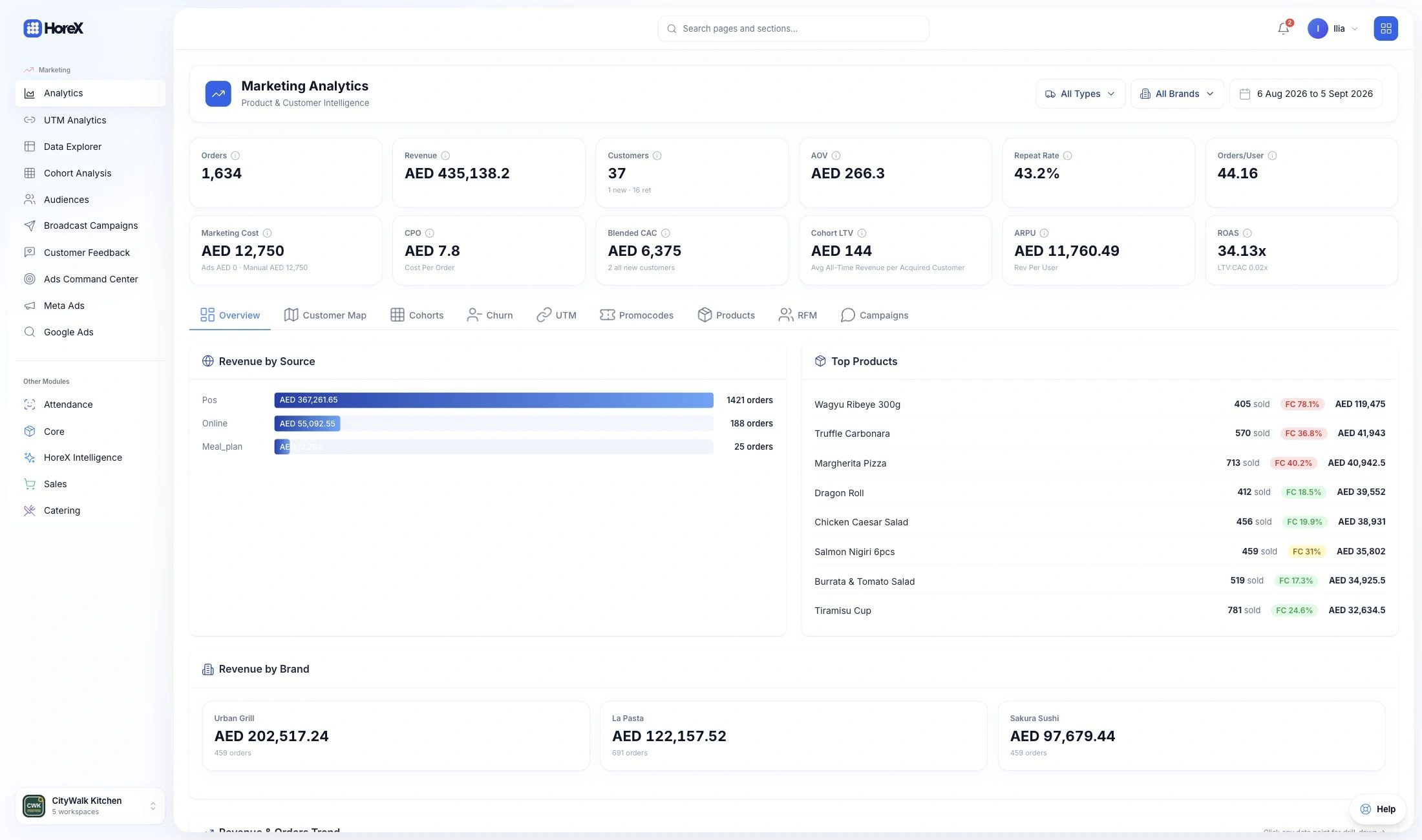
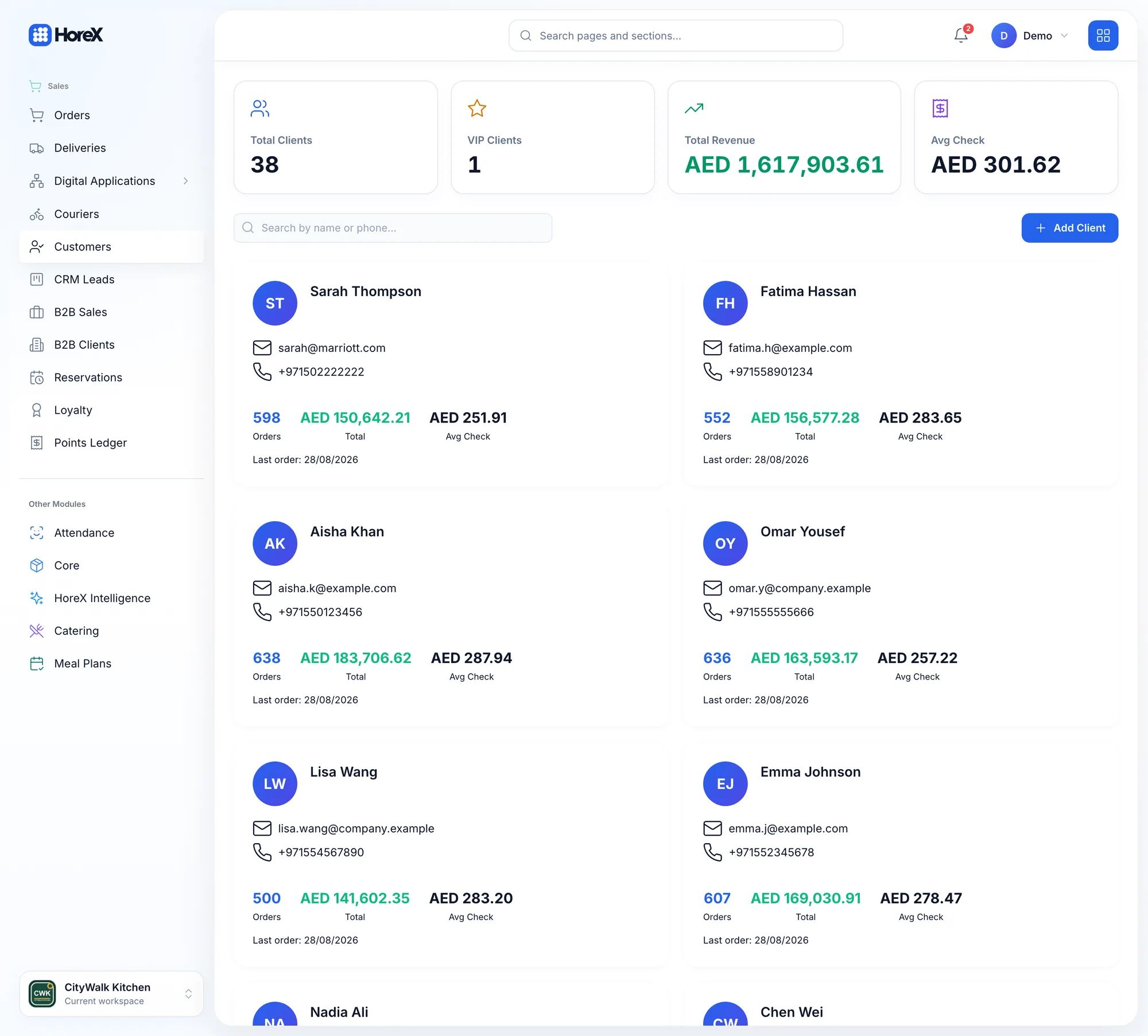
HoreX creates guest profiles from POS orders, deliveries and reservations. You can see what each guest ordered, how much they spent and how often they visit, without entering the same details after every order.
Guest profileCRM
ST
Sarah Thompson
Returning guest
Orders
598
Lifetime value
AED 150,642.21
Average check
AED 251.91
Last order
28 Aug 2026
Audience builder3 rules
Audience name
Re-engage regular guests
ANDAll conditions must match
Total orders
≥3
Days since last order
>30
Lifetime value
≥AED 500
Open a profile to see total spend, average check, favorite dishes, last visit, loyalty balance and past orders. Add tags for VIPs, birthday club members or corporate accounts. Use these details when you welcome a returning guest or send a WhatsApp message about their favorite dish being back on the menu.
Auto guest profiles
Full order history
Lifetime value tracking
Visit frequency analysis
Favorite items detection
VIP & tag system
Multi-channel data merge
Birthday tracking
02 / Loyalty
Restaurant loyalty & Apple Wallet cards
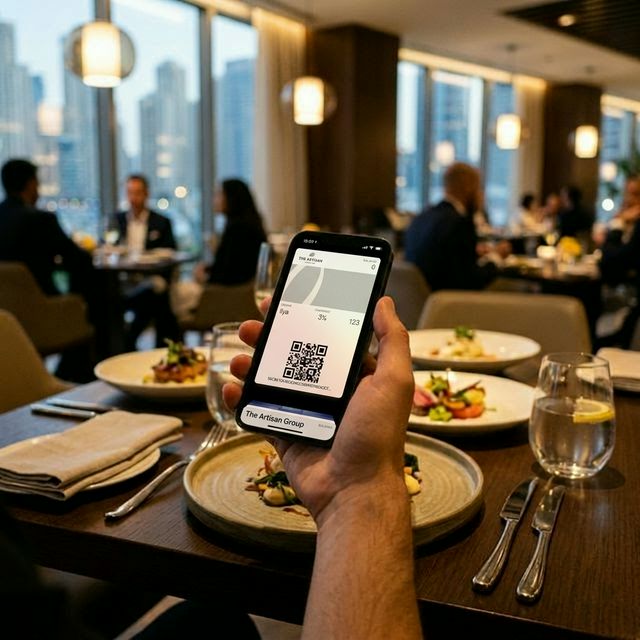
Guests join your loyalty program with their phone number. Points are added automatically from POS and delivery orders, and guests can keep their loyalty card in Apple Wallet without downloading another app or carrying a separate card.
Choose cashback, points per AED, Silver/Gold/Platinum tiers, digital stamp cards or a rewards catalog. For example, offer 5% back as points or a free tenth coffee. Set the rules for earning and spending points, choose the benefits for each tier, and let guests redeem points for menu items. Then check whether members visit more often than other guests.
Cashback & points programs
Apple Wallet digital cards
Digital stamp cards
Rewards catalog
Tier levels (Silver/Gold/Platinum)
Auto-accrual from POS
OTP guest enrollment
Program ROI analytics
Apple Wallet
Restaurant loyalty card
Points, tier level and rewards on your guest’s phone.
CashbackStamp cardsRewards
03 / WhatsApp
WhatsApp campaigns & automations
Send guest messages through WhatsApp Business. Run one-off campaigns or set up messages for birthdays, new guest registrations and orders.
Use approved templates with images, buttons and menu links. Choose an audience for each campaign and set up automations for messages you send regularly. With the AI audience builder, describe who you want to reach, such as “guests who like sushi but haven’t visited this month”, then review the filters. See which messages were delivered, which were read and which led to orders.
See which campaigns lead to orders and whether those guests come back. Marketing reports bring together CRM, loyalty and campaign data, so you can compare new and returning guests and follow the results over time.
Choose from nine views: Overview, Cohorts, Churn, UTM attribution, Promocodes, Product analytics, RFM segmentation, Campaign analytics and Cross-Sell. For in-restaurant visits, loyalty links the guest’s phone number to the POS order and their original acquisition source. Explore marketing analytics →
Full-funnel attribution
Offline visit tracking
Cohort retention analysis
UTM campaign attribution
RFM auto-segmentation
Churn prediction
Cross-sell analysis
9 analytics views
05 / Feedback
Customer feedback & guest reviews
Ask guests how their order went with an automatic WhatsApp message. A short question like “How was your dinner?” makes it easy to leave a rating, while the visit is still fresh in their mind.
Low ratings alert your manager so the team can follow up. Guests who leave a high score can receive a link to review you on Google or TripAdvisor. The dashboard shows NPS trends and recurring issues, such as slow delivery, wrong orders or cold food. Each rating links to the order and staff member, so you can see what happened.
Auto feedback via WhatsApp
Real-time NPS tracking
Negative score alerts
Google redirect for happy guests
Order-linked feedback
Staff performance insights
Issue categorization
Recovery workflow
06 / Advertising
Ads Command Center for restaurants
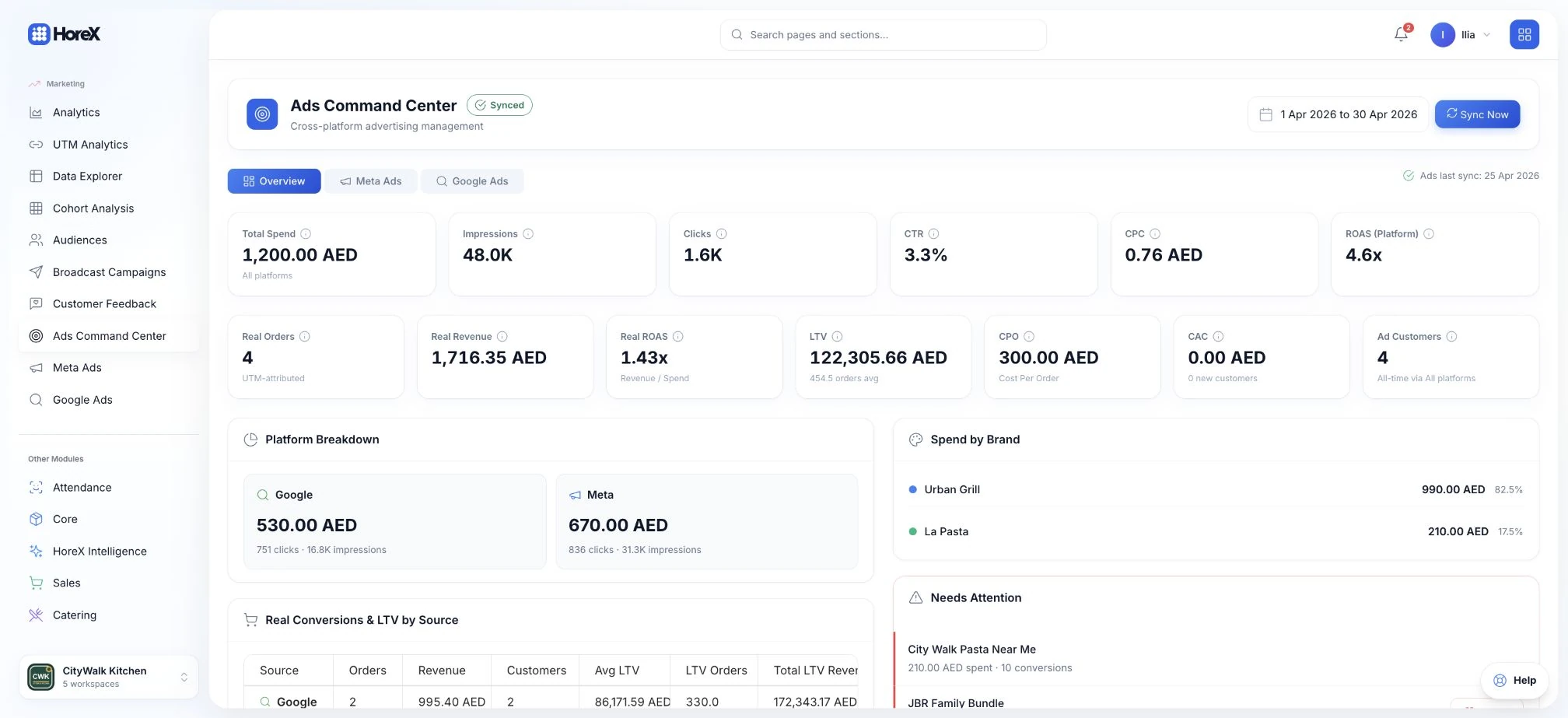
See spend, impressions and clicks from Meta and Google alongside your restaurant’s orders. UTM links connect campaign traffic to orders and guest profiles in HoreX.
Compare the return on ad spend (ROAS) reported by the ad platform with the return calculated from matched HoreX orders. Cancelled orders are excluded. You can check the source and calculation behind each figure.
UTM-based attribution
Campaign/channel comparison
Order-linked reporting
Channel performance views
Daily by concept reports
Creative reference tracking
Audience exports
Attribution-ready analytics
Functionality
All marketing features
From guest identification to retention campaigns, from RFM segmentation to campaign attribution — everything a restaurant marketing team needs.
Guest CRM
Auto-built guest profiles from POS orders. Full history, lifetime value, favorites, visit frequency, and tags.
See details+
Guest CRM
Every order builds a profile. Every profile tells a story.
Most restaurants know their regulars by face but not by data. They can't tell you which guest has spent AED 50,000 over the past year, or which VIP hasn't visited in 3 weeks. HoreX builds this intelligence automatically — no manual entry, no loyalty app sign-up required.
Every POS order, delivery order, and reservation linked to a phone number enriches that guest's profile. Over time, you see their history: visit patterns, total spend, average check, favorite items, last visit, loyalty tier, and past orders. This is the data that powers personalized marketing — and it builds itself.
How Guest CRM works
Guest places an order (POS, delivery, or reservation) — profile is auto-created or updated
System tracks order history, spend patterns, visit frequency, and item preferences
Use profiles to tag guests, personalize interactions, and build marketing audiences
CRM features
Auto profile creation
Full order history
Lifetime value (LTV)
Visit frequency tracking
Favorite items detection
Custom tags & segments
Multi-channel merge
Birthday & anniversary dates
Loyalty Program
Cashback and points programs that accrue automatically from POS. Tier levels, rewards catalog, and program ROI.
See details+
Loyalty Program
Points, tiers, stamp cards, rewards catalog — all frictionless.
Loyalty programs in restaurants fail for one reason: friction. If guests need to download an app, remember a card, or ask staff to "scan" something — they won't bother. HoreX eliminates all friction. Points accrue automatically from every POS and delivery order tied to a phone number. No app. No card. No effort.
Choose your loyalty model: cashback programs (5% back as points), points-per-AED earning, tier levels (Silver/Gold/Platinum with escalating benefits), digital stamp cards, or a rewards catalog. Configure earning rules, burning rules, and tier thresholds. Guests enroll via OTP — their phone is the loyalty ID. Track program ROI: do loyalty members visit more often and spend more than non-members?
Loyalty mechanics
Guest enrolls via OTP → points accrue automatically from every order
Points balance shows on receipt, WhatsApp, and Apple Wallet. Guests burn points at checkout.
Tier upgrades happen automatically. Rewards catalog lets guests redeem points for specific items.
Loyalty features
Cashback & points models
Auto accrual from POS
Tier levels with thresholds
Rewards catalog
Digital stamp cards
Apple Wallet cards
OTP enrollment
Program ROI dashboard
Apple Wallet Cards
Digital loyalty cards in Apple Wallet. Guests access their points and tier from the lock screen. No app needed.
See details+
Apple Wallet Cards
Loyalty card on the lock screen. Zero friction. Always accessible.
Physical loyalty cards get lost. Apps get deleted. But Apple Wallet is always there — accessible from the iPhone lock screen with one swipe. HoreX generates branded digital loyalty cards that guests add to Apple Wallet after enrolling in your loyalty program.
The card shows current points balance, tier level, and your brand design. It updates automatically when guests earn or spend points. When a guest is near your restaurant, the card can appear on the lock screen via location-based notifications. No app to build. No app to maintain. Just a native wallet card that keeps your restaurant top of mind — literally on their phone's home screen.
How Apple Wallet works
Guest enrolls in loyalty → receives a link to add their card to Apple Wallet
Card displays current points, tier level, and your branding. Updates automatically.
Location-aware: card surfaces when guest is near your restaurant. Points balance always visible.
Wallet features
Branded card design
Real-time points balance
Tier level display
Auto-update on transactions
Location-based notifications
One-tap add to Wallet
No app required
Custom card uploads
Apple Wallet Push
Send promotional push notifications through Apple Wallet to all card holders. Lock screen visibility, audience-targeted.
See details+
Apple Wallet Push
Promotional pushes to the lock screen. No app needed — just Wallet.
Your guests have your loyalty card in Apple Wallet. That card is a push notification channel — and it doesn't require a mobile app. HoreX uses Apple's APNs (Apple Push Notification service) to push updates to every wallet card holder. Change the promo text on the card, and Apple notifies the device to refresh — the guest sees the new message on their lock screen.
Use it for flash promotions, event announcements, new menu launches, or seasonal offers. Target specific audiences: push only to Gold tier members, or only to guests in a certain area. Each push is logged with delivery count and audience size. The card updates automatically, so guests see your message without opening a dedicated app.
How Wallet Push works
Write promotional text and optional title → select audience (all wallet holders or specific segment)
HoreX updates the pass promo field and sends APNs push to all registered devices
Guest's iPhone refreshes the card — new promo appears on lock screen. Delivery tracked per member.
Wallet Push features
APNs push notifications
Lock screen visibility
No app required
Audience-targeted pushes
Real-time card update
Promo text customization
Delivery tracking per member
Flash promotion support
Stamp Cards
Digital stamp cards for repeat purchases. Buy 9, get 10th free. Multiple cards per guest. Auto-stamp from POS.
See details+
Digital Stamp Cards
Buy 9, get the 10th free. Classic loyalty — digitized and automatic.
Stamp cards are the simplest and most effective loyalty mechanic for specific product categories. "Buy 9 coffees, get the 10th free." "Every 5th pizza is on us." HoreX digitizes this — no paper cards that get lost, no staff forgetting to stamp. Stamps accrue automatically from POS orders.
Create multiple stamp cards for different categories: a coffee stamp card, a lunch combo card, a dessert card. Each guest can have multiple active cards. When the card is full, the reward applies automatically at the next checkout — or the guest can choose when to redeem. Track which stamp cards drive the most repeat visits and which products benefit most from stamp mechanics.
How stamp cards work
Create a stamp card: select qualifying items, set stamps needed (e.g., 10), and the reward
Guest orders a qualifying item → stamp is added automatically. Progress shows on receipt & WhatsApp.
Card full → reward is available at next checkout. Guest redeems, new card starts automatically.
Stamp card features
Auto-stamp from POS
Multiple cards per guest
Category-specific cards
Configurable thresholds
Auto-reward at checkout
Progress on receipts
WhatsApp notifications
Card performance analytics
WABA Broadcast
Official WhatsApp Business API mass broadcasts. Audience targeting, approved templates, delivery/read/order tracking.
See details+
WABA Broadcast
Mass WhatsApp broadcasts through official Business API. Audience-targeted, template-based, fully tracked.
WABA (WhatsApp Business API) Broadcast is the core outbound channel. Select an audience segment, pick an approved template, personalize variables, and send. HoreX handles delivery tracking, failure handling, and campaign logging inside the same workflow.
Every broadcast is logged as a campaign with recipient count, delivery status, read status, and resulting orders. Compare broadcasts side by side to refine timing, audience, and messaging. Draft broadcasts, review them before sending, and schedule future sends.
Preview the message. Send immediately or schedule for a specific date/time.
System sends through the official WhatsApp workflow. Track delivery, reads, and resulting orders through campaign analytics.
Broadcast features
Official WABA integration
Audience-targeted sends
Approved template system
Variable personalization
Rate-limited delivery
Draft & review flow
Broadcast campaign log
Order conversion tracking
WhatsApp Campaigns
One-time targeted campaigns to segmented guests with order attribution and ROI tracking.
See details+
WhatsApp Campaigns
Official delivery, targeted outreach, and order-linked campaign reporting.
Email marketing for restaurants has a fundamental problem: your guests don't check email when deciding where to eat tonight. WhatsApp is where the conversation already happens. HoreX connects to the official WhatsApp Business API so you can send broadcast campaigns from your real guest data.
The difference from generic WhatsApp blasts: HoreX campaigns are targeted. Build an audience from real data, send a relevant message, and review delivery, read rates, and resulting orders in the campaign analytics layer. This keeps outreach tied to actual guest behavior instead of guesswork.
Campaign workflow
Build an audience using Audience Builder filters (visit recency, spend, preferences)
Create a message using approved WhatsApp templates — add images, buttons, and menu links
Send → track delivery, reads, and resulting orders. Calculate campaign ROI automatically.
Campaign features
WhatsApp Business API
Audience-targeted sends
Rich media support
Approved template system
Delivery & read tracking
Order conversion tracking
Campaign ROI calculation
A/B testing support
Automations
Configured WhatsApp flows for birthdays, guest registration, and order-linked messaging.
See details+
Campaign Automations
Set it once. Messages fire automatically when conditions are met.
Broadcast campaigns are powerful but manual — someone still has to launch them. Automations handle recurring WhatsApp flows tied to real events: guest registration, birthdays, and order-linked updates. Once configured, those messages keep running in the background.
Set the event, select the template, define the timing, and review the conditions. For reactivation, build the right audience first and launch a targeted campaign when needed. The result is less routine manual work without pretending every retention scenario is fully automatic by default.
Automation setup
Choose a trigger: guest registration, birthday, or order-linked event
Set conditions and timing, then select the WhatsApp template
Describe your audience in plain English: "sushi lovers who haven't visited this month". AI builds the filter conditions.
See details+
AI Audience Builder
Describe your audience in plain English. AI builds the segment.
Building audience segments with filters is powerful but can be complex — especially when you're combining multiple conditions. HoreX AI Audience Builder lets you skip the filter UI entirely: just type what you want in plain English.
"Loyal guests who love Japanese food but haven't visited this month." "High spenders from Downtown Dubai who order delivery on weekends." "Guests who gave feedback score below 3 in the last week." The AI parses your natural language description and translates it into the exact filter conditions — visit recency, spend ranges, item categories, delivery zones, feedback scores. Review the generated filters, adjust if needed, and save.
How AI parsing works
Type a natural language description of the audience you want to target
AI translates it into filter conditions: recency, spend, items, zones, scores, tiers
Review and adjust generated filters → preview audience size → save or use in campaign
AI features
Natural language input
Auto filter generation
Multi-condition parsing
Item category detection
Time period understanding
Zone & location parsing
Instant preview count
Edit generated filters
WhatsApp Inbox
One inbox for guest WhatsApp conversations with real-time chat, operator assignment, and full CRM context.
See details+
WhatsApp Inbox
One inbox for guest WhatsApp conversations with full CRM context.
Without a shared inbox, guest messages get split across phones, browser tabs, and operator accounts. HoreX brings WhatsApp conversations into one screen so the team sees the same thread, the same guest profile, and the same context.
Every conversation shows the guest's CRM card: name, lifetime value, loyalty tier, last order, visit history, and active promotions. Real-time messaging via WebSocket keeps the thread current for the team. Send text, images, videos, documents, and voice notes, track message status, assign conversations to operators, and keep unread queues under control.
Inbox workflow
Guest messages via WhatsApp → conversation appears in the shared inbox for the team
Operator opens the thread, sees full CRM profile (LTV, tier, orders), and replies from the same workspace
Unread badges and push notifications help the team stay on top of new messages.
Inbox features
WhatsApp conversations
Shared conversation timeline
Full guest CRM context
Real-time WebSocket chat
Text, image, video, audio
Message status tracking
Operator assignment
Push notification alerts
Audience Segments
Build guest segments with behavioral filters: visits, spend, items, zones, tiers. Save and reuse for campaigns.
See details+
Audience Segments
Target the right guests with the right message at the right time.
Mass marketing does not work well for restaurants. Broad discount blasts train guests to wait for offers. Targeted marketing — the right message to the right guest segment — is much healthier for retention and margins.
HoreX Audience Builder lets you create segments using any combination of guest data: last visit, spend level, order patterns, favorite items, loyalty tier, feedback scores, and delivery zone. Save segments and reuse them for campaigns.
Combine filters with AND/OR logic → preview matching guest count in real time
Save the audience → use it for WhatsApp campaigns, ads targeting, or analytics
Segmentation filters
Visit recency & frequency
Total spend & average check
Favorite items & categories
Delivery zone & address
Loyalty tier & points
Feedback score range
AND/OR filter combination
Dynamic auto-updating segments
Customer Feedback
WhatsApp feedback after every order: 3-button rating, auto-followup by brand, free-text comments. Analytics by rating, concept, trend, and CSV export.
See details+
Customer Feedback
Automated feedback collection via WhatsApp — catch issues while you can still fix them.
After every order, HoreX automatically sends a WhatsApp feedback template with three rating buttons: Excellent, Good, or Could Be Better. The guest taps once — their rating is saved to the customer_feedback table, linked to the specific order and guest CRM profile. No app to download, no survey form. Two seconds and done.
Once a guest rates, HoreX can send a brand-specific follow-up template. If the guest replies with a free-text message in the follow-up flow, that comment is attached to the same feedback record. Your feedback dashboard shows counts by rating, trend charts, concept-level breakdown, filters, response handling, and CSV export.
Feedback flow
Order completes → HoreX sends WhatsApp feedback template with 3 rating buttons automatically
Guest taps rating → saved to database linked to order + guest. Brand-specific follow-up template sent.
Guest can leave a free-text comment in the follow-up flow. Dashboard shows trends, concept breakdown, and CSV export.
Feedback features
Auto WhatsApp requests
3-button rating system
Brand-specific followups
Free-text comment capture
Concept breakdown
Daily trend charts
Rating analytics & filters
CSV export
Analytics Overview
Revenue by source, top products, new vs returning guests, and acquisition trends. Your marketing command center.
See details+
Analytics Overview
8 analytics views in one dashboard. Revenue attribution to order-level detail.
HoreX Marketing Analytics is not a single dashboard — it's 8 analytics views built for restaurant marketing. Overview shows revenue by source, top products, guest acquisition trends. Cohorts reveal month-over-month retention. Churn identifies guests slipping away. UTM tracks ad-to-order attribution. Promocodes shows promo ROI.
Products reveals menu item trends. RFM auto-segments guests into Champions, Loyal, At Risk, and Lost. Campaigns measures WhatsApp performance with order attribution. And Cross-Sell shows which menu items are frequently ordered together. Every view is filtered by date range, concept, and location. One platform, 8 views — no spreadsheets, no data analyst, no BI tool needed.
Analytics tabs
Overview → revenue by source, top items, acquisition trends. Your daily marketing pulse.
Cohorts + Churn + RFM → deep retention analytics. Who stays, who leaves, who's at risk.
UTM + Promocodes + Campaigns → channel performance. Which marketing efforts drive real orders.
Analytics views
Overview dashboard
Cohort retention
Churn analysis
UTM attribution
Promocode performance
Product analytics
RFM segmentation
Campaign tracking
Cohort Analysis
Track guest retention by acquisition cohort. Are January's new guests still visiting in June? Measure true retention.
See details+
Cohort Analysis
Track which month's guests actually came back — and which didn't.
Cohort analysis answers the most important question in restaurant marketing: are your new guests coming back? Group guests by their first-order month (January cohort, February cohort, etc.) and track how many return in month 2, month 3, month 6.
Cohorts reveal whether newly acquired guests are returning over time. If one cohort weakens while a later cohort holds better, you can connect that change to pricing, loyalty, service, or campaign shifts.
How cohort analysis works
Guests are auto-grouped by first-order month (acquisition cohort)
System tracks return visits per cohort over subsequent months
Heatmap visualizes retention rates — spot trends, measure program impact
Cohort features
Auto cohort grouping
Monthly retention tracking
Retention heatmap
LTV per cohort
Churn identification
Before/after comparison
Channel-specific cohorts
Revenue cohort view
Churn Analysis
Identify guests slipping away before they're gone. See churn rates by segment, time period, and acquisition source.
See details+
Churn Analysis
Catch guests slipping away before they're gone for good.
Every restaurant loses guests silently. A regular who used to visit twice a week gradually stops coming. By the time you notice, they've been gone 3 months and moved to a competitor. Churn Analysis catches this early — identifying guests whose visit patterns are declining.
See churn rate by time period, acquisition source, and guest segment. Spot where first visits fail to turn into repeat behavior, or where one channel underperforms another. These insights let you act early: save the segment and launch a reactivation campaign before the guest is fully lost.
How churn analysis works
System monitors guest visit patterns and identifies declining frequency
Dashboard shows churn rates by segment, time period, source, and location
Export churning guests as an audience → send win-back campaign via WhatsApp
Churn features
Auto churn detection
Churn rate by segment
Source-level churn
Location churn comparison
Win-back audience export
Trend over time
Churn vs retention ratio
Early warning signals
RFM Segmentation
Auto-classify guests into Champions, Loyal, At Risk, Lost based on Recency, Frequency, and Monetary value.
See details+
RFM Segmentation
Auto-classify every guest: Champion, Loyal, At Risk, or Lost.
RFM stands for Recency (how recently a guest visited), Frequency (how often they visit), and Monetary (how much they spend). HoreX automatically scores every guest on these three dimensions and classifies them into actionable segments: Champions (recent, frequent, high-spend), Loyal Customers (frequent visitors), At Risk (declining frequency), and Lost (haven't visited in a long time).
Each segment has a clear marketing strategy. Champions: keep them happy, ask for referrals. Loyal: upsell, invite to events. At Risk: prepare a reactivation offer before it's too late. Lost: test a stronger comeback campaign. HoreX shows the size and revenue of each segment, and lets you export any segment as an audience for WhatsApp campaigns. This is data-driven guest management — not guesswork.
How RFM works
System scores every guest on Recency, Frequency, and Monetary dimensions automatically
Guests are classified into segments: Champions, Loyal, Promising, At Risk, Lost, etc.
Each segment shows guest count, revenue, avg check. Export as audience for campaigns.
RFM features
Auto scoring (R, F, M)
Segment classification
Segment size & revenue
Visual RFM matrix
Export as audience
Trend over time
Custom thresholds
Per-concept/location
Cross-Sell Analysis
Which menu items are frequently ordered together? Discover associations for upsell and combo suggestions.
See details+
Cross-Sell Analysis
Which menu items are ordered together? Find the hidden combos.
Market basket analysis for restaurants. HoreX analyzes order history to find items that are frequently purchased together — revealing natural pairing patterns in your menu.
Use these insights to create upsell prompts in your ordering flow, design combo meals based on real behavior, train staff on suggestive selling, and build targeted WhatsApp campaigns. Cross-sell data is more valuable than gut feeling — it tells you exactly what your guests actually do, not what you think they do.
How cross-sell works
System analyzes all orders to find item association patterns and pairing frequencies
Dashboard shows top item pairs, lift scores, and co-purchase probabilities
Use insights for upsell prompts, combo creation, staff training, and targeted campaigns
Cross-sell features
Auto item association
Pair frequency scores
Lift & confidence metrics
Category-level analysis
Time-of-day patterns
Concept/location filter
Combo recommendations
Export for menu design
UTM Tracking
Track which ads, social posts, and links generate actual restaurant orders. Full UTM parameter support.
See details+
UTM Tracking
See which ad, post, or link actually brought the order.
When a guest orders on your website, you need to know how they got there. Was it a Google search, an Instagram ad, a WhatsApp campaign link, or a food blogger's recommendation? UTM parameters attached to your URLs answer this question with precision.
HoreX captures UTM parameters (source, medium, campaign, content, term) from every website order and stores them with the order data. In Marketing Analytics, you see which UTM combinations generate the most orders and revenue. Stop guessing which Instagram story drove sales — tag the link, track the orders.
How UTM tracking works
Add UTM parameters to your marketing links (social posts, ads, emails, WhatsApp)
Guest clicks the link, visits your ordering page, and places an order
HoreX captures UTM data with the order — see attribution in Marketing Analytics
UTM features
Full UTM parameter capture
Order-level attribution
Source/medium/campaign tracking
Revenue per UTM combination
Link builder tool
Multi-touch aware
Analytics integration
Export & reporting
Promocode Analytics
Track promo performance: redemption rates, incremental revenue, discount cost, and ROI per promotion.
See details+
Promocode Analytics
Know which promos drive profit — and which just give discounts away.
Running promotions without tracking their ROI is like burning cash with your eyes closed. HoreX Promocode Analytics shows the full picture for every promotion: redemption count, total discount given, incremental revenue generated, new vs returning guest usage, and average order value with vs without the promo.
See which promos appear to drive incremental visits versus which ones mostly subsidize orders that would likely have happened anyway. This helps you review whether a promotion is building behavior or just discounting existing demand.
How promo tracking works
Create promocodes in HoreX with rules (discount %, min order, valid dates, usage limit)
Guests redeem promos at checkout. System tracks every redemption with full order context.
Compare campaign and channel activity against real orders with tagged-link attribution and marketing analytics.
See details+
Ads Command Center
See ad spend and resulting restaurant orders in one dashboard.
Paid platforms show clicks and impressions, while restaurant systems show orders. HoreX helps close that reporting gap by tying tagged traffic and campaign activity back to real orders and guest records.
Inspect Meta and Google campaigns, creatives, spend and reported conversions. Compare those platform metrics with UTM-attributed orders and revenue in HoreX. Review budget or status changes before applying them through the connected account workflow.
How it works
Tag paid campaigns consistently with UTM parameters
Orders and guest activity are tied back to those tagged links in analytics
Review campaign and channel performance against real orders inside HoreX
Ads features
UTM-based attribution
Channel performance analysis
Order-linked reporting
Campaign comparison view
Daily by concept view
Creative reference tracking
Audience exports
Connected Meta and Google accounts
Data Explorer
Freestyle data queries on your marketing data. Group, filter, and visualize any dimension you need.
See details+
Data Explorer
Ask any question about your marketing data. Get the answer.
Standard dashboards answer standard questions. But marketing teams always have specific queries: "What's the average order value from guests acquired through Instagram in Q2?" or "Which menu items are most popular among loyalty Gold tier guests?" Data Explorer answers these ad-hoc questions.
Select dimensions (time, channel, segment, item, zone), metrics (orders, revenue, avg check, visits), and filters. The system builds the report on the fly with tables and charts. Save reports you use regularly as bookmarks. No SQL needed — it's a visual query builder designed for restaurant marketers, not data engineers.
Explorer workflow
Select dimensions: time period, channel, guest segment, menu category, location
Choose metrics: order count, revenue, average check, visit frequency, conversion rate
Apply filters → get the report as table and chart. Save it for regular use.
Explorer features
Visual query builder
Any dimension combination
Table & chart output
Saved report bookmarks
Filter by anything
Export to CSV/PDF
Scheduled email reports
No SQL required
Marketing Events
Track marketing funnels: website visits, menu views, cart starts, order completions. Channel-level conversion.
See details+
Marketing Events
Track the full journey from first click to completed order.
Marketing funnels for restaurants have distinct steps: website visit → menu viewed → cart started → order placed. HoreX Marketing Events tracks each step, showing you where guests drop off and which channels have the best conversion rates.
See funnel metrics across the journey: website visits, menu views, cart starts, and completed orders. Compare channels and campaigns to see where guests drop off and where conversion is healthier.
How event tracking works
HoreX tracking pixel captures website events: page view, menu view, add to cart, checkout
Events are attributed to marketing channels via UTM parameters
Funnel visualization shows conversion rates per channel and campaign
Event features
Website event tracking
Funnel visualization
Channel-level conversion
Drop-off identification
Real-time metrics
UTM attribution
Multi-step funnels
Historical comparison
Custom Reports
Build and save custom marketing reports with your preferred metrics, filters, and scheduling.
See details+
Custom Reports
Build, save, and schedule the exact reports your team needs.
Every restaurant marketing team has their own KPIs. For some it's weekly new guest count, for others it's loyalty redemption rates or WhatsApp campaign conversions. Custom Reports lets you build the exact report you need, save it, and optionally schedule it to arrive in your inbox every Monday morning.
Select your metrics and dimensions from a simple interface — no coding required. Group by time period, channel, location, or guest segment. Add filters to focus on what matters. Save the report with a name, and it appears in your reports library. Schedule weekly or monthly email delivery to your team. Over time, you build a personal analytics dashboard that matches exactly how your team thinks about marketing performance.
Add filters and grouping. Preview the report in real-time.
Save with a name → access from reports library. Optionally schedule email delivery.
Report features
Drag-and-drop builder
Any metric combination
Saved report library
Scheduled email delivery
CSV & PDF export
Shareable report links
Multiple chart types
Team dashboards
Frequently asked questions
How does restaurant CRM software work in UAE?
HoreX automatically builds guest profiles from POS orders, delivery orders, and reservations. Each profile includes full order history, total spend, average check, favorite items, visit frequency, and loyalty points balance. Tag guests (VIP, birthday club, corporate) and use these profiles to personalize marketing. No manual data entry — every order enriches the CRM automatically.
How does a restaurant loyalty program work in Dubai?
HoreX loyalty supports cashback-based and points-based programs. Configure earning rules (e.g., 5% cashback on every order), burning rules (spend points on next order), and tier levels (Silver/Gold/Platinum with increasing benefits). Points accrue automatically from POS and delivery orders. Guests see their balance on receipts or via WhatsApp.
Can I send WhatsApp marketing campaigns to restaurant guests in UAE?
Yes. HoreX integrates with WhatsApp Business API for broadcast campaigns. Build an audience segment from guest activity or spend patterns, create a message with text, images, or menu links, and send. Track delivery rates, read rates, and resulting orders through the campaign analytics layer.
What is audience segmentation for restaurant marketing?
The Audience Builder lets you create dynamic guest segments using filters: last visit date, total spend, order count, favorite items, delivery zone, loyalty tier, feedback score, and more. Combine filters with AND/OR logic to build precise audiences for WhatsApp campaigns or advertising targeting.
How do UAE restaurants collect customer feedback automatically?
After each order, HoreX can automatically send a feedback request via WhatsApp. Guests rate their experience on a simple scale. Reviews feed into a dashboard where you see NPS trends, identify issues, and catch negative experiences before they become public Google reviews. Respond to unhappy guests immediately.
How do restaurants track marketing ROI in Dubai?
Yes. The Marketing Analytics dashboard shows revenue attribution per campaign and channel. Track UTM parameters from website orders, measure WhatsApp campaign conversions, and see cohort retention. Data Explorer lets you build custom reports on any marketing dimension.
What is the Ads Command Center for restaurant advertising?
Ads Command Center combines connected Meta and Google campaign metrics with UTM-attributed HoreX orders. Compare platform ROAS with order-linked ROAS, inspect campaigns and creatives, and review changes through the connected workflow.
How does restaurant marketing software connect to POS systems?
HoreX marketing is fully integrated with operations. Guest CRM is fed by POS orders in real-time. Loyalty points accrue automatically from every sale. Campaign audiences are built from actual order data, not imported lists. Feedback connects to specific orders and staff.
See how it works for your restaurant.
We’ll walk you through guest profiles, loyalty and WhatsApp campaigns, and answer your questions.