Take orders, manage tables and keep the kitchen in sync. Split the bill, accept payments and close the shift — with stock and accounts updated from the same sale.
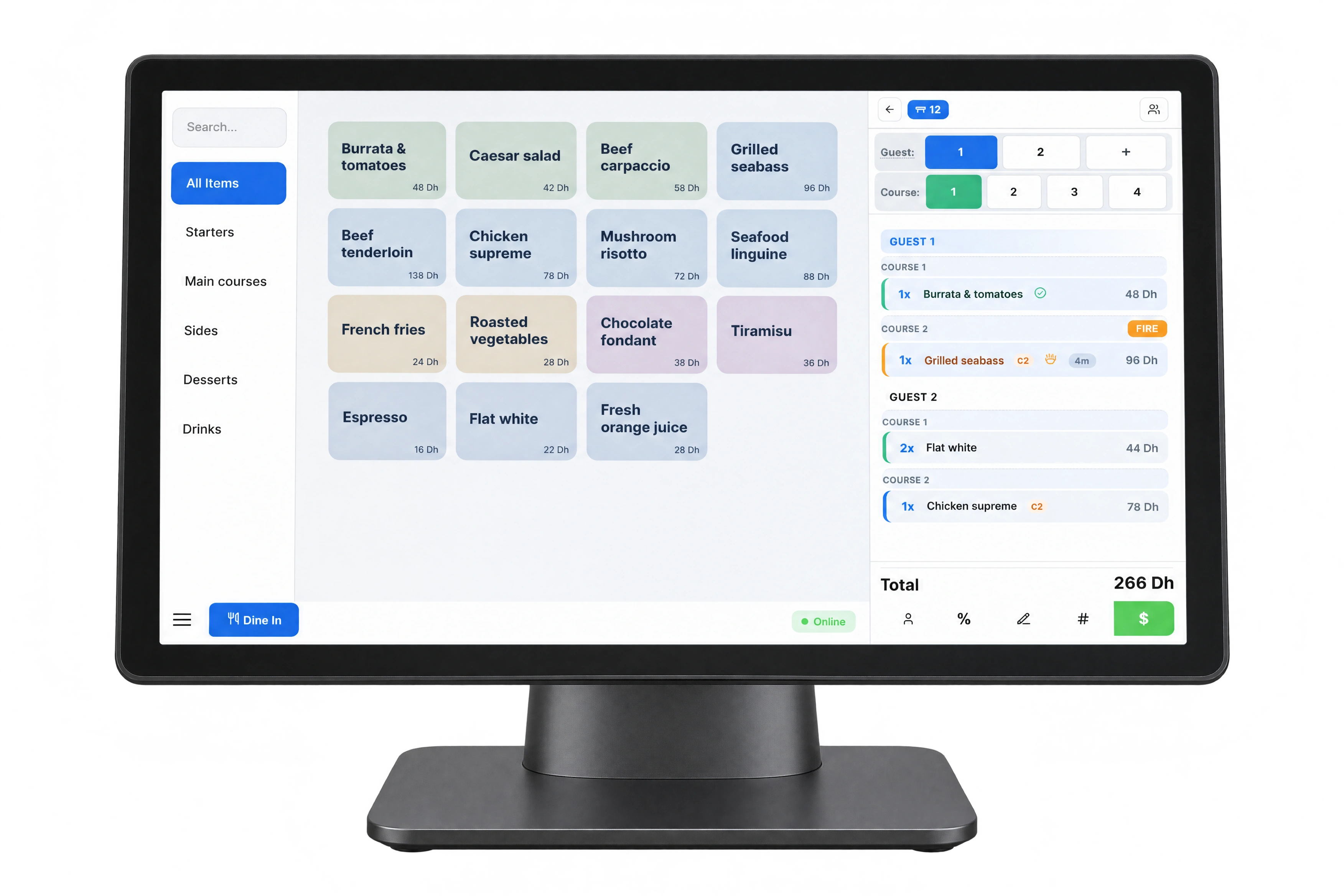
Built for speed on industrial touchscreens. Bottom-first navigation keeps primary actions within easy reach — no stretching over the bezel. Smart item stacking, structured modifiers, and multi-guest ordering out of the box.
Works on any modern browser. Dedicated Electron app for Windows with silent printing and kiosk mode.
Adaptive grid layout
Quick quantity stacking
Category sidebar
Split bill & payments
Modifier support
Discount engine
Multi-guest ordering
Silent thermal printing
Dark theme mode
Per-item fractional split
02 / Floor plan
Tables and halls, laid out your way.
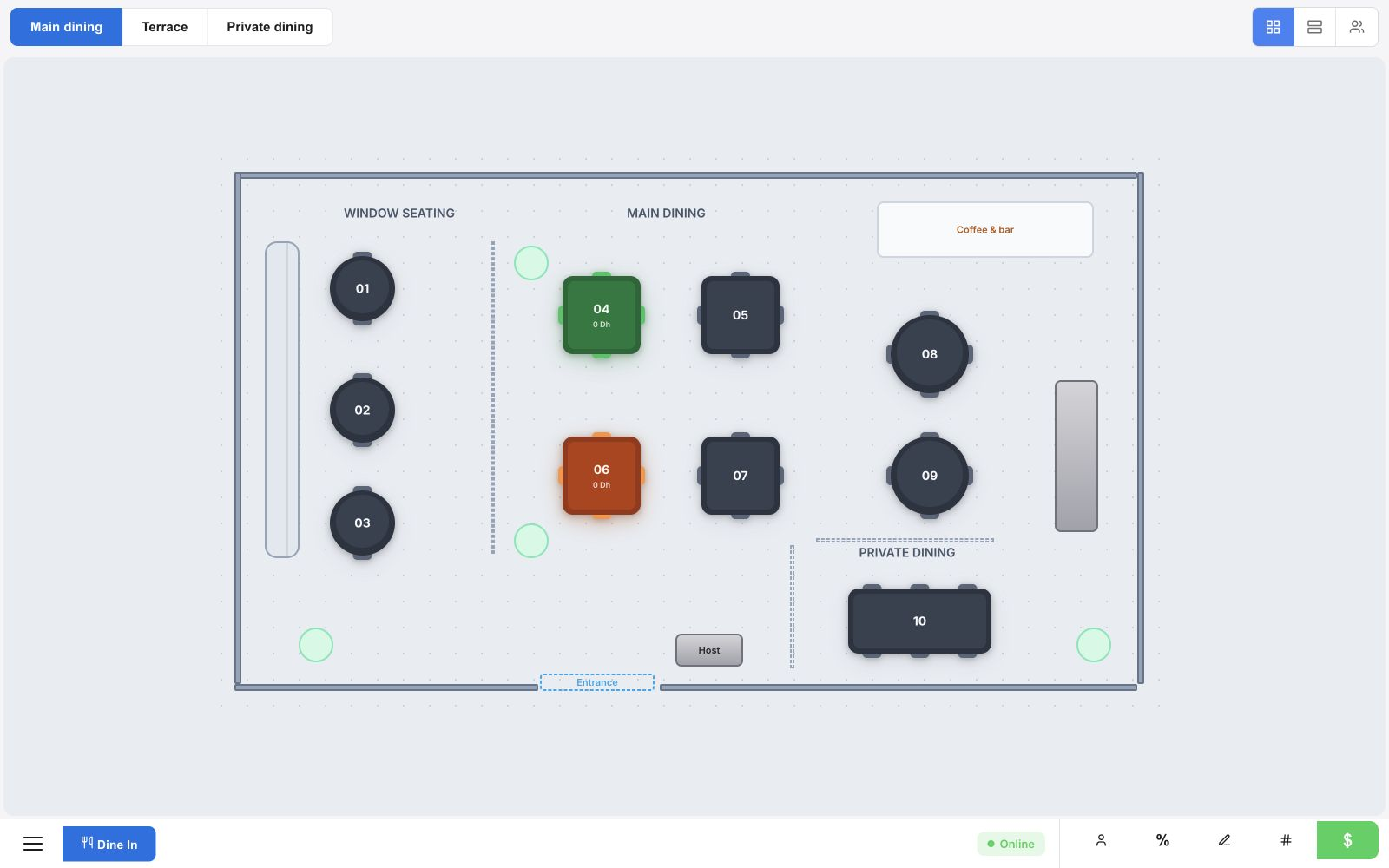
Design your restaurant layout with drag-and-drop walls, bars, and decorative elements. See every table's status at a glance — color-coded and updated in real time across all terminals.
Drag-and-drop floor builder
Color-coded table status
Multi-hall support
Real-time occupancy
03 / Kitchen display
Kitchen orders, by station and course.
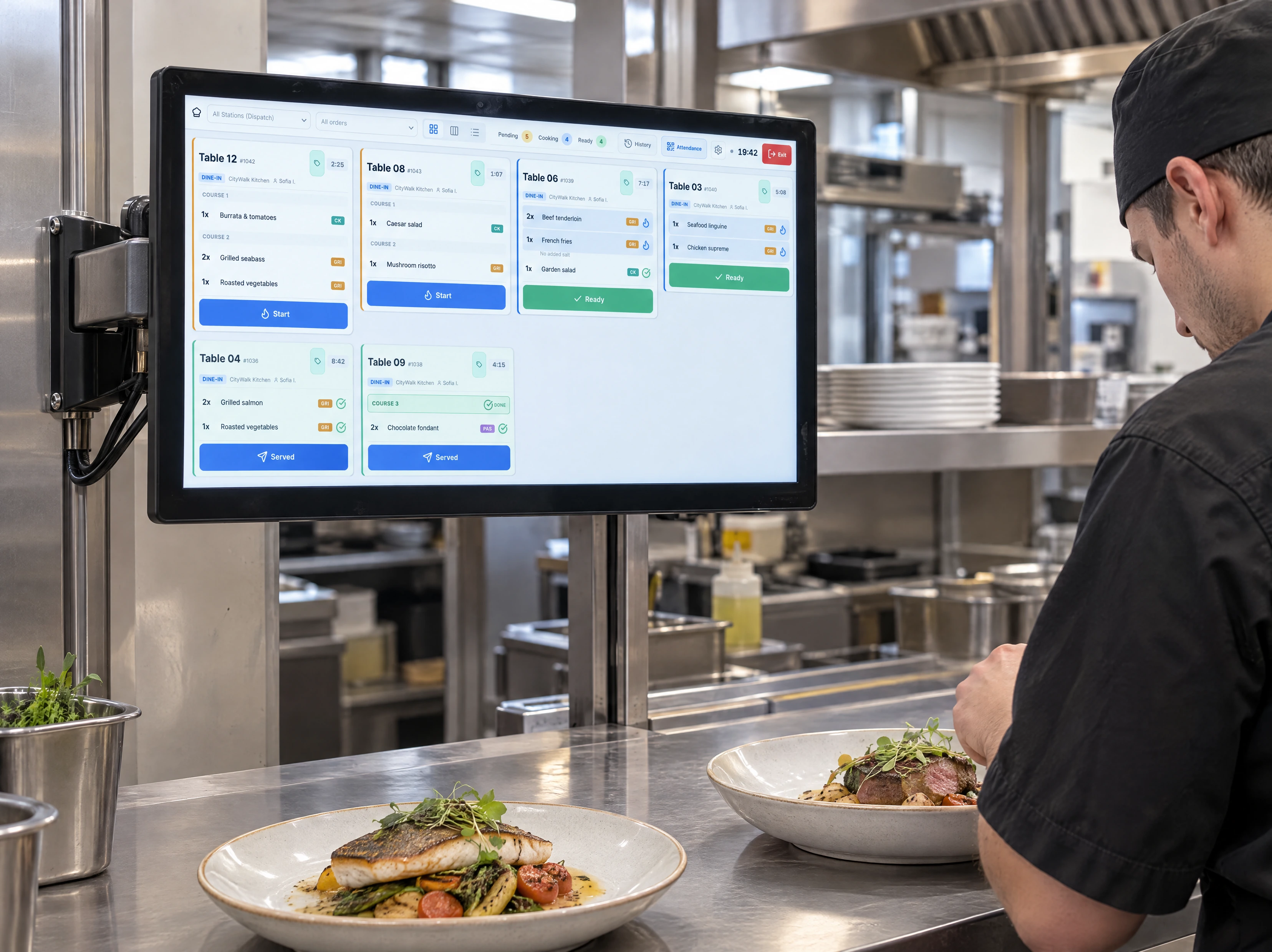
The Kitchen Display System replaces thermal printer chaos with a structured digital workflow. Grid, Kanban, All-Day, and Dispatch views — each station sees only its own items.
KDS Grid & Kanban views
Station-based filtering
Ready-for-pickup alerts
All-Day & Dispatch views
Hold and fire courses
Waiter pickup notifications
04 / Waiter app & offline
Take the order at the table.
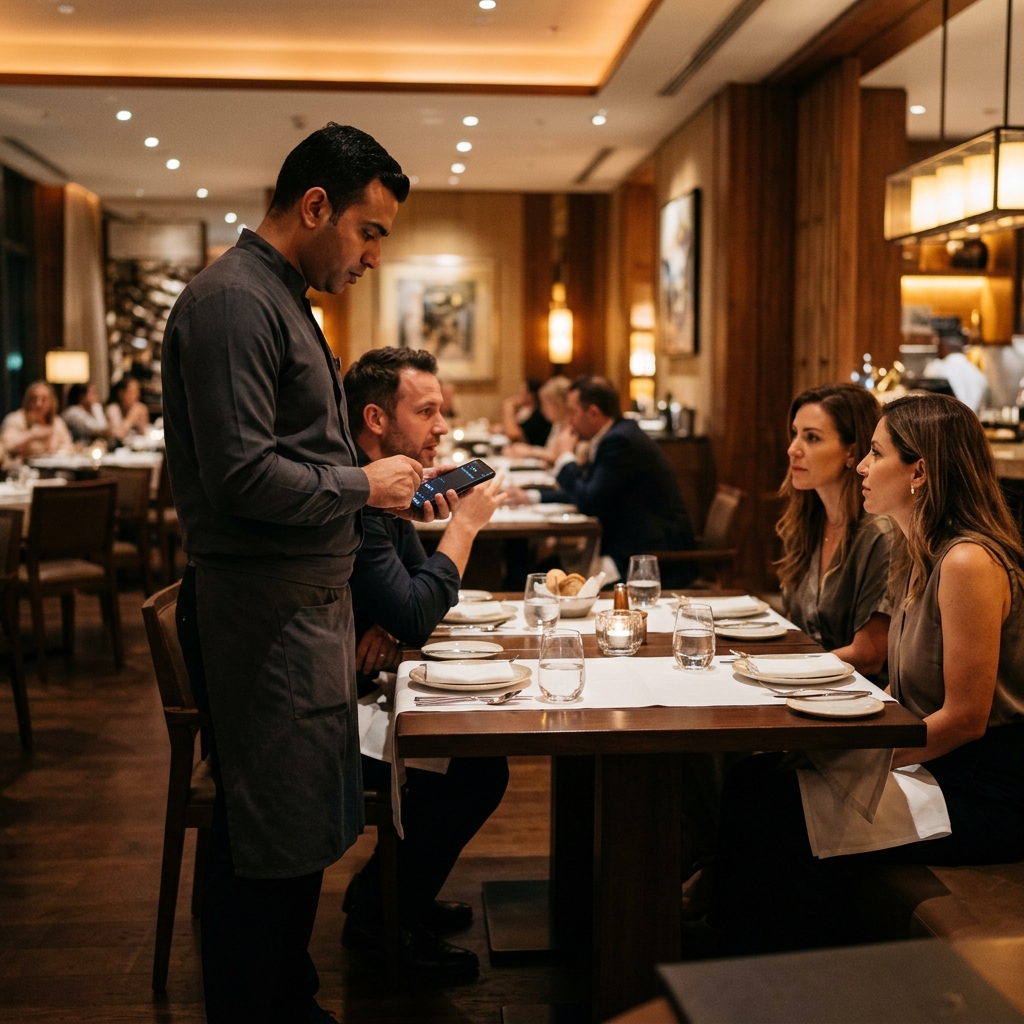
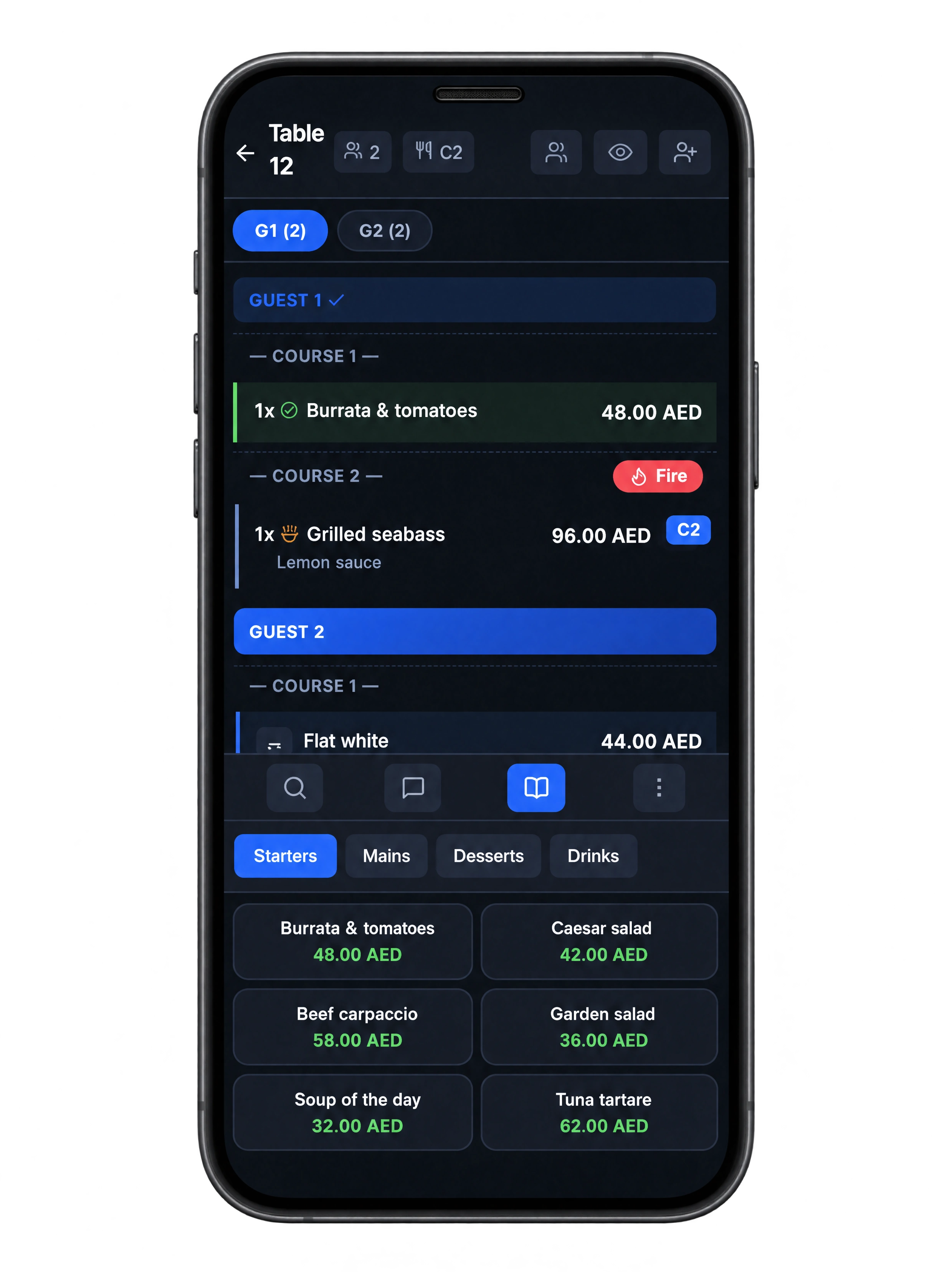
A convenient, feature-rich mobile app designed for waiters to deliver faster and seamless service. Take orders tableside, assign items per guest, control course timing, and get instant notifications — all from a personal smartphone.
Works offline too. If the internet drops, the POS keeps taking orders locally. Receipts print from the device, kitchen displays stay connected via LAN. When connection returns, everything syncs automatically — zero lost orders.
Tableside ordering
Offline order queue
Per-guest assignment
Local receipt printing
Course timing control
LAN-based KDS sync
Push notifications
Auto reconnect & sync
05 / Payments & shifts
Split the bill. Reconcile the shift.
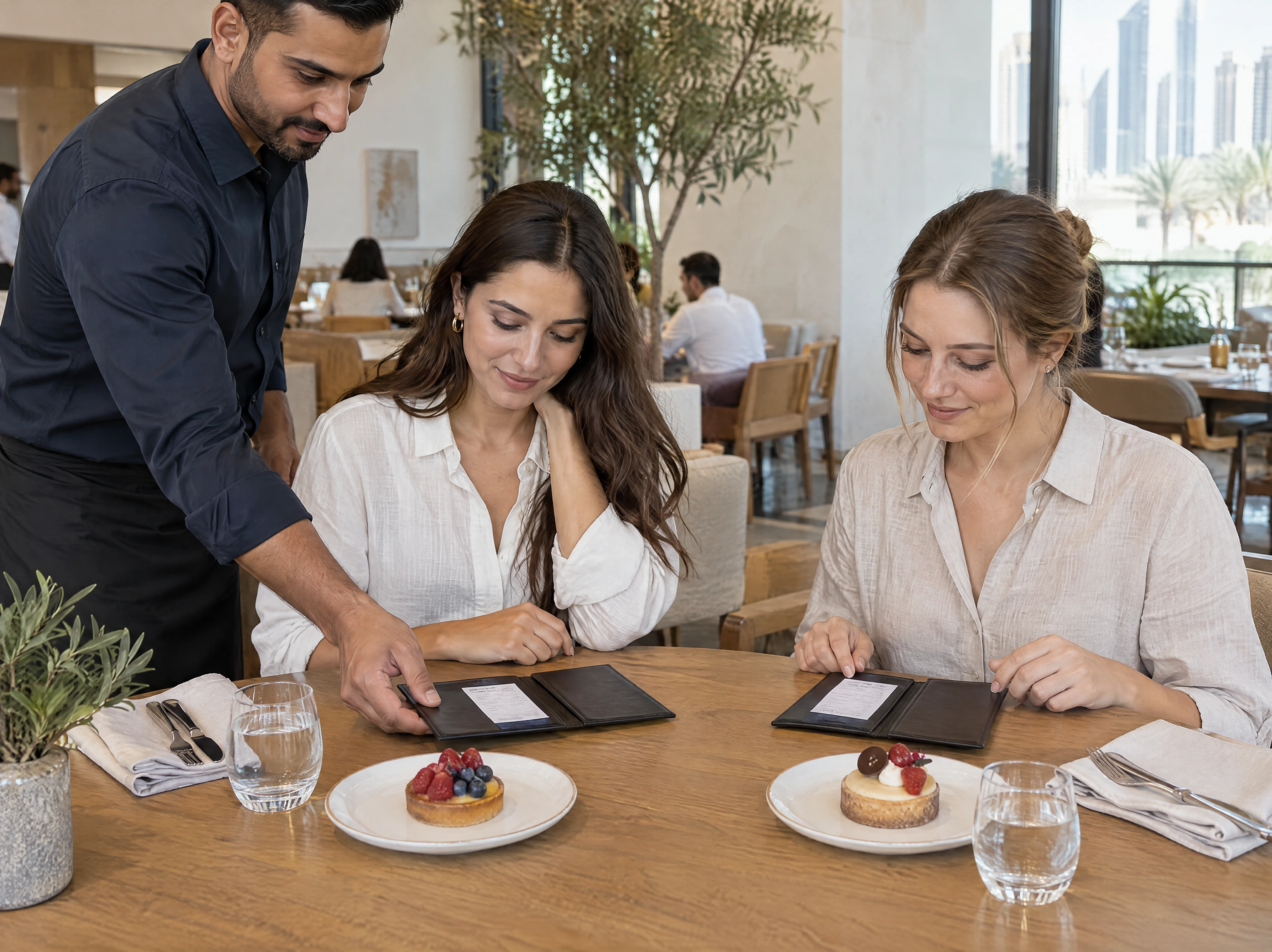
One guest pays cash, another pays by card. Split by guest, item or equal share, and combine payment methods on the same check.
At closing, compare counted cash with the expected drawer balance. The Z-report brings together sales, payment methods, discounts and voids, with each action tied to an operator.
Per-guest & per-item split
Fractional dish splitting
Cash + card on one check
Loyalty points at checkout
Opening & closing cash
Z-reports & discrepancies
Operator audit trail
Permission-controlled discounts
06 / Connected records
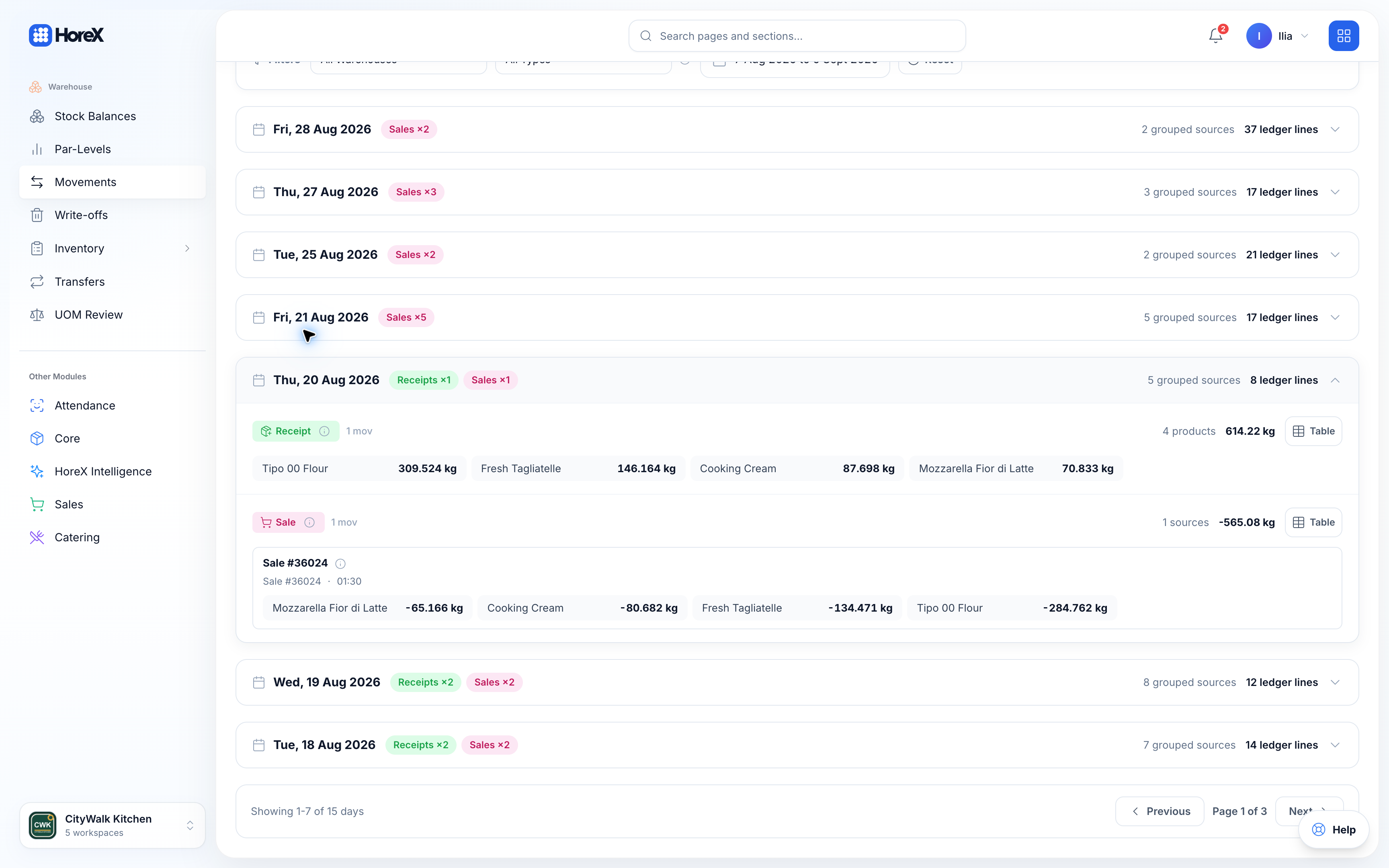
Each sale updates stock and accounts.
Every POS transaction automatically triggers ingredient write-offs, updates recipe costs, records revenue in P&L, routes delivery orders to the unified kitchen queue, builds guest purchase history, and logs waiter performance metrics.
No exports. No copy-paste. No reconciliation spreadsheets. Data flows in real time across every module — because POS is just one node in the HoreX platform.
Ingredient write-off
Guest purchase history
Recipe cost tracking
Waiter metrics
Real-time P&L
Unified kitchen queue
All POS features
What your team can do.
Explore the full feature list, including setup, permissions, service controls and reporting.
Offline mode
Orders saved locally, receipts print from device, KDS works over LAN. Full service without internet.
See details+
Offline mode
Your restaurant never stops — even when the internet does.
Internet outages happen — especially during peak hours when your router is overloaded, or during construction work nearby. With HoreX Offline Mode, your entire POS system continues to function as if nothing happened. Orders are placed, receipts are printed, and the kitchen display stays updated.
The moment connectivity returns, all data syncs automatically to the cloud — no manual export, no missing orders, no revenue leaks. Your shift report will be complete and accurate regardless of how long the outage lasted.
How it works
Internet drops — POS detects the outage instantly and switches to local mode
Orders continue to be taken, receipts print locally, KDS updates via LAN
Connection returns — everything syncs to the cloud automatically, zero data loss
What stays working
Taking new orders
Bill splitting & payments
Receipt printing
Waiter app (local network)
Kitchen display (KDS via LAN)
Discount & promo engine
Modifier & guest splitting
Shift open/close & Z-report
API integration orders
Your own website and apps — direct API integration into the kitchen queue. Talabat, Deliveroo, Careem coming soon.
See details+
API integration orders
Your website orders — straight into the kitchen. Aggregators coming soon.
If you have your own website or mobile app, HoreX gives you a direct API to push orders into the same kitchen queue as dine-in and takeaway. No separate dashboard, no manual re-entry — online orders appear on the KDS alongside walk-in guests, with full inventory deduction and revenue tracking.
Integration with delivery aggregators — Talabat, Deliveroo, and Careem — is coming very soon. When it launches, all platforms will feed into one unified queue. One screen for the kitchen, per-channel reporting for managers, zero missed orders.
How it works
Your website or app sends an order via the HoreX API webhook
Order appears in the unified kitchen queue with source badge and routing
Replace printer chaos with a structured digital kitchen workflow.
Thermal printer tickets get lost, smudged, and stacked in the wrong order. The HoreX Kitchen Display System gives every station a dedicated screen showing only the items they need to prepare — in real time, with color-coded urgency and timing.
Choose between Grid, Kanban, All-Day, and Dispatch views depending on your kitchen style. Items progress through Pending → Cooking → Ready with a single tap. When a dish is ready, the waiter gets an instant push notification — no more shouting across the pass.
How it works
Order is placed from POS, waiter app, or delivery platform
Items are routed to the correct kitchen station display based on category
Chef taps to advance status — waiter is notified when items are ready for pickup
KDS capabilities
Grid & Kanban views
Station-based item filtering
Color-coded urgency timers
All-Day summary view
Ready-for-pickup alerts
Dispatch coordination
Multi-station support
Course-aware firing
Mixed payments
Cash + card on the same check. Multiple methods per order.
See details+
Mixed payments
Cash, card, or both — on the same check, no workarounds.
Guests often want to split payment between cash and card, or pay partially with a loyalty balance. Most POS systems force you to close the order on one method and manually adjust the rest. HoreX handles mixed payments natively — add as many payment methods as needed on a single check.
Each payment line is logged separately in the shift report, so your cash-in-drawer and card totals always reconcile cleanly. No manual math, no end-of-shift discrepancies.
How it works
Open the payment screen and select the first method — enter the amount
Add a second (or third) payment method for the remaining balance
Close the order — each method is logged separately in the shift report
Supported methods
Cash
Bank card
Loyalty points
Multiple methods per order
Automatic balance calculation
Clean shift reconciliation
Per-method reporting
Change calculation
Course firing
Hold courses, fire manually when ready. Full control over service timing.
See details+
Course firing
Appetizers first, mains when ready. You control the timing.
Fine dining and multi-course service require precise timing — appetizers should arrive before mains, and desserts only when the table asks. HoreX course firing lets you hold items in the kitchen queue and release them to production exactly when you decide.
Waiters and managers control the pacing from POS or the waiter app. The kitchen sees only what's been fired, avoiding premature preparation and cold dishes. Guests get a properly paced dining experience every time.
How it works
Waiter takes the full order and assigns items to courses (1st, 2nd, 3rd…)
Course 1 fires immediately to the kitchen — remaining courses are held
Waiter fires the next course with one tap when the table is ready
Course firing features
Multiple course levels
Manual fire control
Per-course KDS routing
Hold & release from waiter app
Course status visibility
Kitchen sees only fired items
Cross-station coordination
Course timing logs
Shift logging
Full history of shift opens, closes, and operator activity for audit.
See details+
Shift logging
Complete audit trail — every shift open, close, and operator action.
Knowing who did what during a shift is critical for accountability. HoreX logs every shift event: who opened, who closed, cash declared at start and end, every discount given, every void performed, and every payment processed — all timestamped and tied to the operator.
Managers can review shift activity remotely from the admin panel. If there's a cash discrepancy or a suspicious void, you can trace it to the exact operator, order, and minute it happened.
How it works
Operator opens a shift — declares starting cash amount
All actions during the shift are logged: orders, voids, discounts, payments
Operator closes the shift — system generates a Z-report with full reconciliation
What gets logged
Shift open & close events
Cash declarations
Operator identification
Discount & void log
Payment method breakdown
Timestamped action trail
Cash discrepancy alerts
Remote manager review
Multi-operator system
20 waiters, 3 terminals. Each gets a personal PIN, revenue tracking, and full accountability.
Restaurants run on teams, not individuals. HoreX supports multiple operators across multiple terminals — each with their own PIN, revenue tracking, and permission level. Switch between operators in seconds without closing the terminal.
Every order, discount, and void is tied to the specific operator who performed it. Managers see individual performance metrics: revenue generated, average check size, tables served, tips collected. Full accountability without micromanagement.
How it works
Admin creates operator profiles with individual PINs and permission sets
Operators log in via 4-digit PIN on any terminal — instant switch, no restart
All actions are attributed to the logged-in operator for reporting and accountability
Operator capabilities
Multiple operators
Personal 4-digit PIN
Per-operator revenue tracking
Individual performance metrics
Cross-terminal login
Permission-based access
Auto-lock after inactivity
Operator activity log
Auto write-off
Every sale deducts ingredients by recipe card. Real food cost in real time.
See details+
Auto write-off
Sell a burger — flour, meat, and sauce deduct automatically.
Manual stock counting after every shift is a relic. HoreX connects every menu item to its recipe card — when a dish is sold through POS, all ingredients are automatically deducted from warehouse stock based on exact recipe quantities.
This gives you real-time food cost visibility. You always know your actual stock levels, can spot variances between theoretical and actual usage, and catch waste or theft before it becomes a pattern. No spreadsheets, no guesswork.
How it works
Menu item is sold through POS — system looks up the linked recipe card
Each ingredient in the recipe is deducted from warehouse stock by exact quantity
Real-time food cost updates in the dashboard — managers see actual vs. theoretical usage
Auto write-off features
Recipe-based deduction
Real-time stock levels
Multi-ingredient recipes
Variance detection
Food cost percentage
Branch-aware warehousing
Semi-finished product chains
Write-off audit trail
Multi-guest ordering
Assign items to Guest 1, 2, 3 during ordering. Per-person billing at checkout.
See details+
Multi-guest ordering
Assign every dish to the right guest — billing is automatic.
When a table of four wants separate checks, most waiters scribble notes on paper and pray they remember who ordered what. HoreX lets you assign items to Guest 1, Guest 2, Guest 3 directly during ordering — no post-facto guessing.
At checkout, split billing by guest is one tap. Each guest's items are grouped, totaled, and can be paid with different methods. The kitchen ticket shows guest assignments too, so plating can be organized by seat.
How it works
Waiter selects a guest number (Guest 1, Guest 2…) before adding items to the order
Each item is tagged with the guest it belongs to — visible on POS and kitchen ticket
At checkout, tap "Split by guest" — each person gets their own bill and payment method
Multi-guest features
Guest assignment during ordering
Per-guest billing
Kitchen ticket guest labels
Individual payment methods
Drag items between guests
Multiple guest count
Guest-aware receipt printing
Combine guests back if needed
Discount engine
Percentage or fixed — per item or per order, with permission control.
See details+
Discount engine
Flexible discounts with full permission control.
Discounts are a daily reality in restaurants — happy hour specials, staff meals, manager comps, VIP treatment. HoreX provides a flexible discount engine that supports percentage and fixed amounts, applied per item or per order, with full audit trail.
Most importantly, discounts are permission-controlled. A junior waiter can't give a 50% discount without manager approval. Every discount is logged with who applied it, when, and on which order — protecting your margins while keeping service flexible.
How it works
Operator selects items or the full order and taps "Apply discount"
Choose percentage or fixed amount — system checks operator permission level
Discount is applied and logged with operator name, time, and reason
Discount engine features
Percentage discounts
Fixed amount discounts
Per-item or per-order
Permission-based limits
Manager approval workflow
Discount reason logging
Shift report breakdown
Maximum discount caps
Dark theme
'Sober Dark' mode for low-light bars and late-night service.
See details+
Dark theme
Easy on the eyes during late-night shifts and low-light venues.
Bars, lounges, and late-night restaurants operate in dim lighting where a bright white POS screen is a flashlight in your staff's face. HoreX's "Sober Dark" theme uses carefully calibrated dark backgrounds with high-contrast text — comfortable for extended use without eye strain.
It's not just an inverted color scheme. Every element — buttons, badges, status indicators, and category cards — has been redesigned for dark mode with distinct accent colors that maintain readability and prevent misclicks in fast-paced environments.
How it works
Toggle dark theme in terminal settings — applies instantly, no restart needed
All POS screens, modals, and overlays switch to the dark palette
Theme preference is saved per terminal — each station can have its own setting
Dark theme features
Calibrated dark backgrounds
High-contrast text
Redesigned status indicators
Per-terminal preference
Instant toggle, no restart
Eye strain reduction
Consistent across all screens
Accent color preservation
Terminal branding
Upload your logo — lock screen auto-adapts colors to your brand.
See details+
Terminal branding
Your logo, your colors — the POS feels like yours.
When a customer glances at the POS screen or the waiter's lock screen, they should see your brand — not a generic software logo. HoreX lets you upload your restaurant logo, and the system automatically extracts your brand colors and applies them across the lock screen, accent elements, and UI highlights.
It's a small detail that makes a big difference in perceived professionalism. Your team works with a tool that looks and feels like it was built specifically for your restaurant.
How it works
Upload your restaurant logo in terminal settings
System extracts dominant colors from the logo automatically
Lock screen, UI accents, and status bars adapt to your brand palette
Branding features
Logo upload
Automatic color extraction
Branded lock screen
Custom accent colors
Per-terminal branding
Receipt logo support
Consistent brand feel
One-click reset to default
Shift & Z-reports
Open/close shifts with declared cash. Auto Z-report with revenue and discrepancy detection.
See details+
Shift & Z-reports
Open. Sell. Close. Get a complete financial summary — automatically.
Every shift starts with a cash declaration and ends with a Z-report. HoreX generates a detailed financial summary: total revenue by payment method, orders count, average check, discounts given, voids performed, and the crucial cash discrepancy — the difference between expected and declared cash.
Z-reports feed directly into your financial dashboard. No manual entry into accounting software. Revenue, expenses, and cash flow data flow in real time, giving managers and finance teams instant visibility into each location's performance.
How it works
Operator opens a shift and declares starting cash in the drawer
Throughout the shift, all transactions, discounts, and voids are automatically tracked
Operator closes the shift — Z-report generates with full revenue breakdown and discrepancy check
Report contents
Revenue by payment method
Order count & average check
Discount breakdown
Void & cancellation log
Cash discrepancy detection
Automatic financial sync
Historical shift archive
Multi-terminal consolidation
Multi-hall management
Main Hall, Terrace, VIP — switch between halls with tabs.
See details+
Multi-hall management
Main Hall, Terrace, VIP — all in one system.
Many restaurants operate multiple seating areas: main dining, outdoor terrace, private rooms, bar seating. HoreX lets you define separate halls, each with its own floor plan and table layout, and switch between them with a simple tab interface.
Each hall has its own table grid and status tracking. Waiters see only their assigned hall, reducing confusion. Managers see all halls at a glance with real-time occupancy, revenue, and average table time per zone.
How it works
Admin creates halls in the floor plan editor: Main, Terrace, VIP, etc.
Tables are placed on each hall's grid with drag-and-drop positioning
POS operators switch between halls via tab bar — each hall shows its own table status
Multi-hall features
Multiple hall count
Per-hall floor plans
Tab-based switching
Independent table grids
Waiter assignment per hall
Per-zone revenue tracking
Real-time occupancy
Hall-level reporting
Table transfer
Move guests between tables without losing the order.
See details+
Table transfer
Move guests without losing orders, payments, or course progress.
A couple at table 5 wants to move to the terrace. A large group needs to merge two tables. These situations happen daily, and they shouldn't require voiding orders and re-entering everything. HoreX table transfer moves the entire order — items, modifiers, guest assignments, course status — to the new table in one tap.
The kitchen doesn't see a new order. The waiter's history stays connected. Payment records remain linked. It's a seamless relocation that keeps the entire order lifecycle intact.
How it works
Tap the active table and select "Transfer"
Choose the destination table from the floor plan — can be the same or different hall
Order, modifiers, guest splits, and course status move instantly to the new table
Transfer capabilities
Full order transfer
Cross-hall moves
Guest assignments preserved
Course status intact
Modifier data retained
No kitchen re-fire
Payment history linked
Instant floor plan update
Loyalty system
Points, bonuses, and guest purchase history — built into POS.
See details+
Loyalty system
Turn first-time visitors into regulars — with points, history, and perks.
Customer retention costs five times less than acquisition. HoreX's built-in loyalty system tracks every guest's purchase history, accumulates bonus points on orders, and lets you apply rewards directly at the POS — no third-party apps, no plastic cards.
Managers can configure earning rules (points per AED spent), redemption rates, and bonus multipliers for specific products or time slots. Guest profiles show total lifetime value, visit frequency, and favorite items — turning data into personal service.
How it works
Guest registers by phone number — profile is created automatically at first order
Every purchase earns points based on configurable rules (e.g., 1 point per 10 AED)
Points can be redeemed as payment at checkout — balance deducts from the order total
Loyalty features
Points accumulation
Points redemption at POS
Guest purchase history
Lifetime value tracking
Visit frequency stats
Favorite items insight
Configurable earning rules
Bonus multiplier campaigns
Waiter application
Take orders, track readiness, serve guests faster from any phone.
See details+
Waiter application
A full-featured app on every waiter's personal phone.
Ordering at the table shouldn't require walking back to the terminal. The HoreX Waiter App runs on any smartphone browser — no app store install needed. Waiters take orders tableside, assign items to guests, control course timing, and see the full menu with modifiers and images.
When a dish is ready in the kitchen, the waiter gets an instant push notification on their phone. No more checking the pass, no more shouting across the floor. Service speed increases, mistakes decrease, and guests feel the difference in attentiveness.
How it works
Waiter opens the app on their phone and logs in with their personal PIN
Select a table, add items with modifiers and guest assignments — order fires to kitchen
Push notification arrives when items are ready — waiter serves directly
Waiter app features
Tableside ordering
Full menu with modifiers
Guest assignment
Course timing control
Push notifications (item ready)
Order status tracking
No app install needed
Works on any smartphone
Table status
Free, occupied, needs attention — color-coded on the floor plan.
See details+
Table status
Every table's state — at a glance, updated in real time.
A busy restaurant needs instant visibility: which tables are free, which are occupied, which need attention. HoreX color-codes every table on the floor plan — green for free, blue for occupied, red for needs attention — updated across all terminals in real time.
Managers see the full picture without walking the floor. Hosts know exactly where to seat the next party. Waiters see when their table's order has been sitting too long. It's a living map of your restaurant's current state.
How it works
Tables are laid out on the floor plan in the drag-and-drop editor
As orders are placed and processed, table colors update automatically in real time
All terminals and the waiter app see the same synchronized floor plan status
Table status features
Color-coded status
Real-time sync across all devices
Free / Occupied / Attention states
Time tracking per table
Host seating assistance
Multi-terminal consistency
Visual floor plan layout
Occupancy analytics
Stop lists
Mark items as unavailable in one tap. Menu updates instantly across POS, waiter app, and KDS.
See details+
Stop lists
Out of salmon? One tap — gone from every screen, instantly.
Running out of an ingredient mid-service is stressful enough without manually telling every waiter, updating every terminal, and hoping nobody takes an order for the unavailable dish. HoreX stop lists let you mark any item as unavailable in one tap — and it instantly disappears from POS, waiter app, and KDS across all devices.
When the ingredient is back in stock, remove it from the stop list and it's available again everywhere. The entire process takes seconds. No miscommunication, no embarrassing "sorry, we're out of that" moments with guests who already ordered.
How it works
Kitchen or manager marks an item as unavailable (adds to stop list)
Item instantly disappears from POS, waiter app, and is marked on KDS
When ingredient is restocked, remove from stop list — item is available everywhere again
Stop list features
One-tap item blocking
Instant cross-device sync
POS, waiter app, KDS coverage
Easy reinstatement
Per-branch stop lists
Category-level blocking
Stop list history log
No missed orders on blocked items
Cash flow report
Track money in and out. Z-reports feed directly into your financial dashboard.
See details+
Cash flow report
Track every dirham in and out — no spreadsheet required.
Cash handling in restaurants is a high-risk area for shrinkage and accounting errors. HoreX tracks every cash movement: payments received, change given, cash-in (top-ups), cash-out (petty cash, vendor payments), and shift-level reconciliation — all in real time.
Z-reports feed directly into the financial dashboard. Managers and accountants see daily cash flow without waiting for end-of-month reconciliation. Discrepancies between expected and actual cash-in-drawer are flagged immediately with exact amounts.
How it works
Every cash transaction at the POS is logged with type, amount, and operator
Cash-in and cash-out operations are recorded against the active shift
Z-report consolidates all movements — discrepancies are flagged automatically
Cash flow features
Real-time cash tracking
Cash-in & cash-out logging
Per-shift reconciliation
Discrepancy detection
Z-report integration
Financial dashboard sync
Operator accountability
Historical cash flow reports
PIN-based login
4-digit PIN switch between operators. 10-min auto-lock.
See details+
PIN-based login
Fast operator switch. Secure terminal access. Zero friction.
Typing a full username and password at a greasy touchscreen during rush hour is impractical. HoreX uses 4-digit PINs for instant operator switching — tap your code and you're in. The terminal auto-locks after 10 minutes of inactivity to prevent unauthorized access.
Each PIN is unique to an operator and tied to their permission set. The lock screen shows your restaurant's logo with brand-matched colors, and switching between operators doesn't interrupt the current session — orders in progress stay intact on the screen.
How it works
Terminal auto-locks after 10 minutes of inactivity (branded lock screen)
Operator enters their 4-digit PIN on the numpad — instant authentication
System loads operator's permissions and attribution — all actions are logged to this person
PIN login features
4-digit PIN auth
10-minute auto-lock
Branded lock screen
Instant operator switch
Permission-aware sessions
In-progress orders preserved
Failed attempt logging
Unique PIN enforcement
Permission system
Granular access: view orders, give discounts, void items — all separate permissions.
See details+
Permission system
Fine-grained control over who can do what — per action.
Not every operator should be able to give discounts, void items, or access reports. HoreX's permission system lets you define granular access per action: a junior waiter can place orders but can't give discounts over 10%. A shift lead can void items but can't access financial reports. A manager gets full access.
Permissions are configured per position (role) and inherited by all operators assigned to that position. Change a permission once, and it applies to everyone in that role — no need to edit individual accounts.
How it works
Admin defines positions (Waiter, Shift Lead, Manager) with specific permission sets
Each operator is assigned to a position — they inherit all its permissions
When an operator attempts a restricted action, the system blocks it or requires manager override
Permission system features
Per-action granularity
Role-based inheritance
Discount limits
Void & cancel restrictions
Report access control
Manager override flow
Position-based management
Audit trail for blocked actions
Split billing
Per-item, equal split, or divide a single dish between multiple guests.
See details+
Split billing
Per item, per guest, or equal — any way the table wants.
The dreaded "Can we split the bill?" request is a daily occurrence. HoreX makes it effortless: split by guest (each person pays for their items), split equally (total divided by head count), or even split a single dish fractionally between two guests who shared it.
Each split produces a separate payment record. Guests can pay with different methods — Guest 1 with cash, Guest 2 with card. Receipts are printed per guest. Shift reports still balance perfectly because every dirham is tracked to its payment method and check.
How it works
Tap "Split bill" on the order screen — choose split method: by guest, equal, or custom
System generates separate checks — each guest selects their payment method
All payments are logged individually — shift report reconciles automatically
Split billing features
Per-item split
Equal split by headcount
Fractional item splitting
Per-guest billing
Mixed payment methods
Separate receipts
Shift report reconciliation
Undo & recombine
Push notifications
Waiter gets pinged when item is ready for pickup.
See details+
Push notifications
Dish ready? Waiter knows instantly — no shouting, no checking.
The gap between "dish is ready" and "dish reaches the guest" is where service quality lives or dies. In busy restaurants, waiters constantly check the pass or rely on kitchen staff shouting. HoreX sends an instant push notification to the waiter's phone the moment the chef marks an item as ready.
The waiter picks up the dish and serves it while it's hot. No wasted trips to the kitchen. No cold food sitting on the pass. Guests get their meals faster, and the waiter can focus on service instead of playing courier between kitchen and floor.
How it works
Chef taps "Ready" on the KDS for a completed dish
Assigned waiter receives an instant push notification on their phone
Waiter picks up the dish and serves — zero delay, zero guesswork
Yes. If the internet drops, the POS keeps taking orders locally. Receipts print from the device, and kitchen displays stay connected via LAN. When the connection returns, everything syncs automatically — zero lost orders.
What hardware do I need?
HoreX POS works on any modern browser — tablets, touch monitors, or dedicated POS terminals. For Windows, there's a dedicated Electron app with silent printing and kiosk mode support. No proprietary hardware required.
Can waiters take orders from their phones?
Yes. The HoreX Waiter App runs on any smartphone. Waiters can take orders tableside, assign items to specific guests, control course timing, and receive push notifications when items are ready.
Does POS integrate with delivery aggregators?
Right now, HoreX offers direct API integration for your own websites and apps — orders flow straight into the unified kitchen queue alongside dine-in. Integration with Talabat, Deliveroo, and Careem is coming very soon.
Can I split a bill between guests?
Yes. HoreX supports per-item split, equal split, and even fractional splitting of a single dish between multiple guests. Mixed payment methods (cash + card) are supported on the same check.
Is inventory deducted automatically?
Yes. Every time a POS sale is made, ingredients are automatically deducted based on the recipe card. This gives you real-time food cost and stock levels without any manual work.
How is HoreX different from Foodics?
HoreX is positioned as a broader restaurant operating system, not just a POS. A sale can update inventory, recipe costs, finance data, guest history, and waiter metrics inside the same product ecosystem, so the team works with fewer disconnected tools and less manual reconciliation.
How much does it cost?
We offer flexible plans tailored to your restaurant size and needs. Book a personalized demo and our team will walk you through the pricing options that fit your operation.
See POS with your team’s workflow.
We’ll walk through taking an order, sending it to the kitchen and closing the bill. Bring your questions about hardware, setup and switching systems.